
Depuración en Python — encuentra errores sin volverte loco
Depuración en Python es una de las habilidades más importantes que nadie te enseña directamente en primero. Sabes escribir código, pero cuando algo falla, y siempre falla, no sabes por dónde empezar a buscar.
En este artículo te explico cómo depurar en Python usando las tres herramientas que más uso: Thonny, Python Tutor y el depurador de VS Code. Además veremos los tres tipos de errores que más aparecen en FP1 y cómo identificarlos rápido.
Tabla de Contenidos
¿Qué es depurar?
Depurar (del inglés debug) es el proceso de encontrar y corregir errores en tu código. Un bug es cualquier cosa que hace que tu programa no funcione como esperas, puede ser un error que rompe el programa o un resultado incorrecto silencioso que pasa desapercibido.
Hay tres tipos de errores que te encontrarás constantemente en FP1:
Errores de sintaxis (SyntaxError)
El código está mal escrito y Python no puede ni ejecutarlo. Son los más fáciles de encontrar porque Python te dice exactamente en qué línea está el problema:
# SyntaxError típico — falta el : al final del if
if x > 5
    print("mayor")
```
```
SyntaxError: expected ':'
Errores de tipo (TypeError, ValueError)
El código tiene buena sintaxis pero en algún punto intentas hacer algo con un tipo de dato incorrecto:
# TypeError — sumar texto con número
edad = input("Edad: ")
nueva_edad = edad + 1    # input() devuelve str, no int
```
```
TypeError: can only concatenate str (not "int") to str
Errores silenciosos
El más peligroso. El programa ejecuta sin errores pero el resultado es incorrecto. Python no te avisa porque técnicamente no hay ningún error, simplemente la lógica está mal:
# Error silencioso — falta paréntesis en la media
media = nota1 + nota2 + nota3 / 3    # divide solo nota3 entre 3
# Resultado incorrecto pero sin error
Para este tercer tipo es donde la depuración es más importante.
Herramienta 1 — Thonny
Thonny es el editor que usamos en clase en FP1. Tiene un depurador visual muy intuitivo que es perfecto para empezar. Para depurar en Thonny:
Abre tu archivo en Thonny y en vez de darle al botón de play normal (F5), dale al botón de «Debug», el icono del insecto. Esto ejecuta el programa paso a paso.
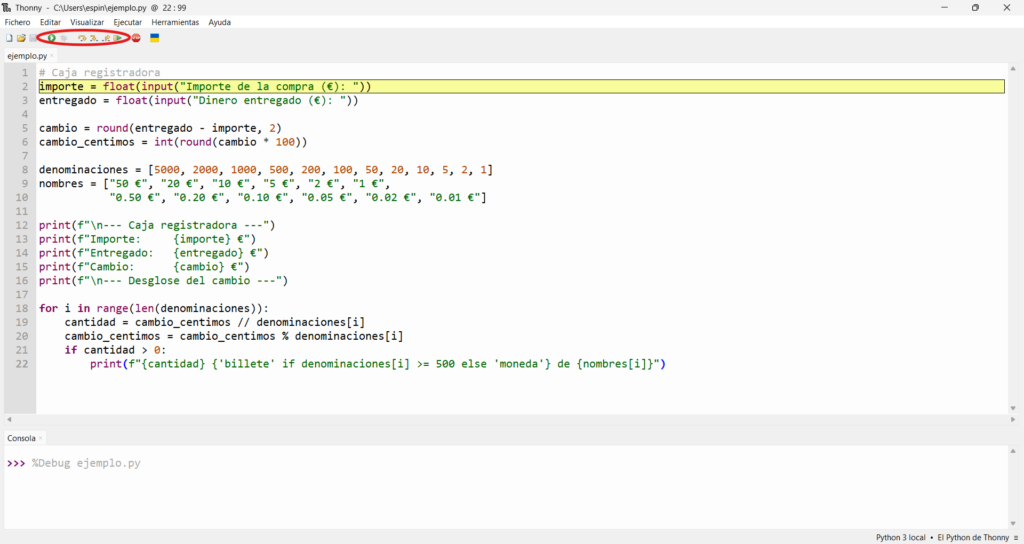
Con el programa en modo debug tienes estos controles:
Step Over (F6) — ejecuta la línea actual y pasa a la siguiente. Úsalo para avanzar línea por línea viendo cómo cambian las variables.
Step Into (F7) — entra dentro de una función para ver qué hace por dentro.
Step Out (F8) — sale de la función actual y vuelve al código principal.
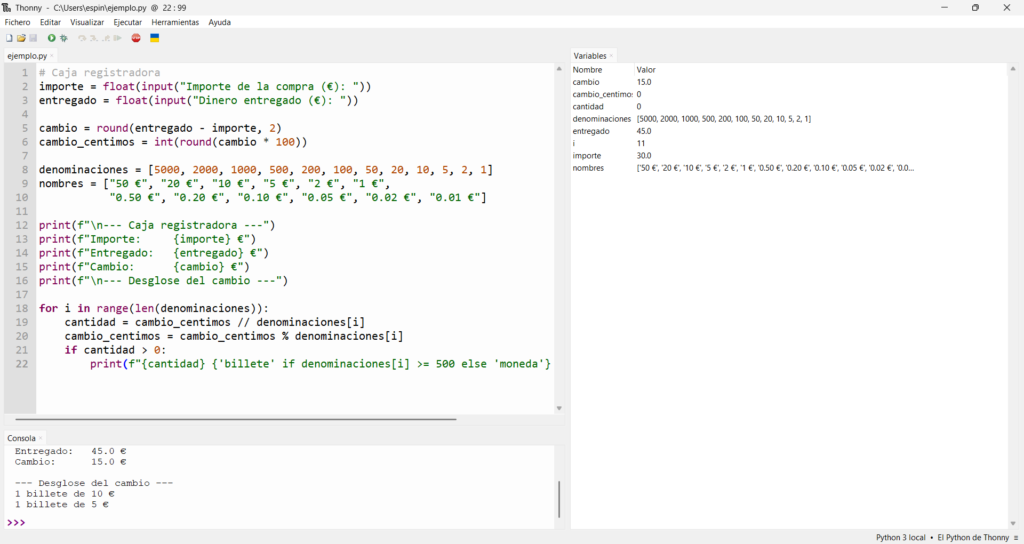
Lo más útil de Thonny es el panel de Variables en la parte derecha (ábrelo desde el menú de «Visualizar»), muestra en tiempo real el nombre, tipo y valor de cada variable mientras el programa avanza. Es la forma más visual de ver exactamente qué está pasando.
Herramienta 2 — Python Tutor
Ya hemos mencionado Python Tutor en artículos anteriores porque es perfecta para visualizar cómo Python gestiona la memoria. Para depurar con ella:
Ve a pythontutor.com, pega tu código y dale a «Visualize Execution». Verás el código con una flecha que indica qué línea se ejecuta ahora mismo, y a la derecha todos los objetos en memoria con sus valores.
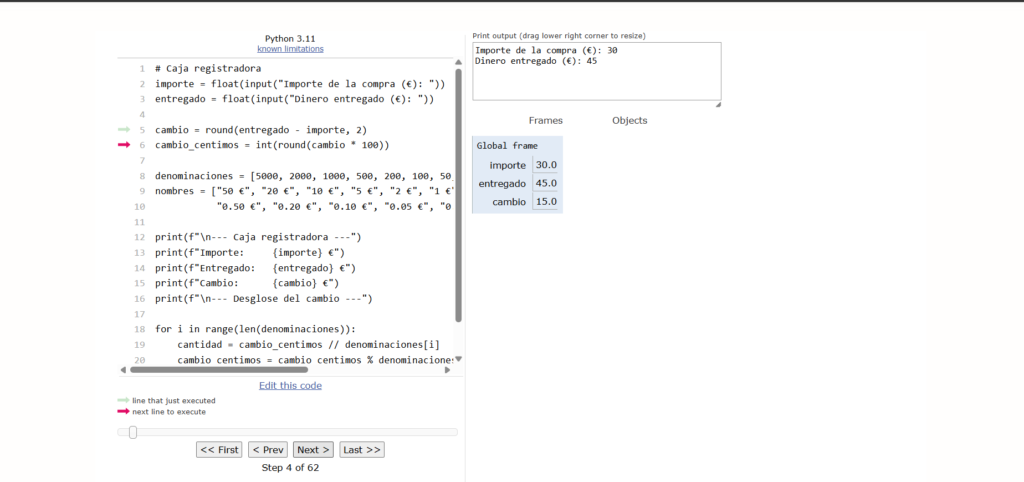
Es especialmente útil para entender errores silenciosos, puedes ver exactamente qué valor tiene cada variable en cada momento y detectar dónde la lógica se tuerce.
Herramienta 3 — El depurador de VS Code
Yo no sabía que VS Code tenía depurador integrado hasta hace poco, y es muy potente. Para usarlo:
Abre tu archivo .py en VS Code y haz clic en el número de línea donde quieres que el programa se pause, aparecerá un punto rojo llamado breakpoint.
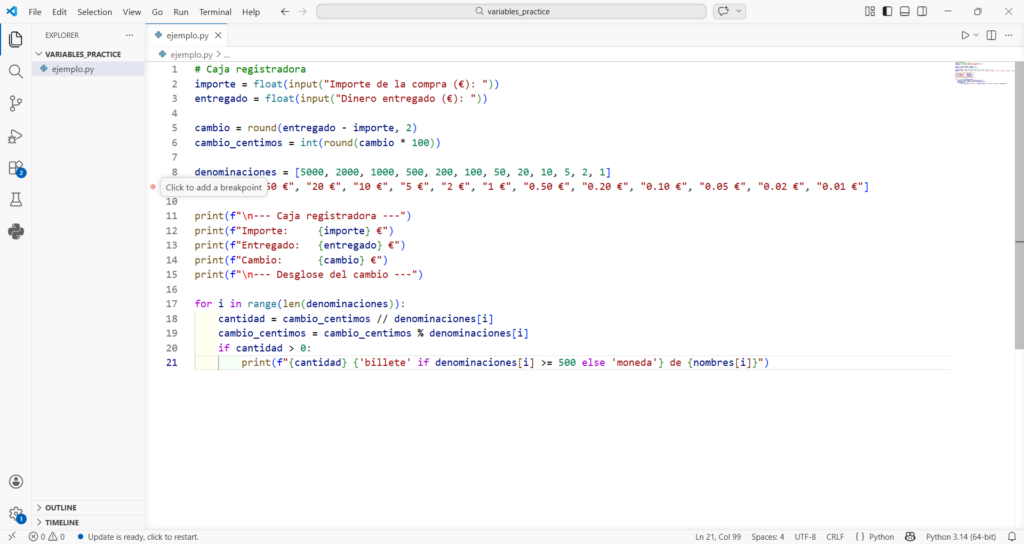
Luego pulsa F5 o ve a Ejecutar → Iniciar depuración. El programa se ejecutará hasta llegar al breakpoint y se pausará ahí.
En el panel izquierdo verás:
Variables — todas las variables activas con sus valores actuales.
Watch — puedes añadir expresiones para monitorizar. Por ejemplo nota1 + nota2 te muestra el resultado de esa suma en tiempo real.
Call Stack — muestra en qué función estás en cada momento.
Los controles de depuración son iguales que en Thonny:
F5 → Continuar hasta el siguiente breakpoint
F10 → Step Over (siguiente línea)
F11 → Step Into (entrar en función)
F12 → Step Out (salir de función)
Mi flujo de depuración en la práctica
Después de usar estas herramientas en FP1, este es el orden que sigo cuando algo falla:
Paso 1 — Leo el error completo. Si Python da un error, lo leo entero, especialmente la última línea que dice el tipo de error y el número de línea. No busco en Google antes de leer el mensaje completo.
Paso 2 — Busco el error en Google. Copio el mensaje de error exacto y lo busco. El 99% de los errores de primero ya están resueltos en Stack Overflow.
Paso 3 — Añado prints para rastrear. Si no hay error pero el resultado es incorrecto, añado print() temporales para ver el valor de las variables en puntos clave:
nota1 = 7.5
nota2 = 8.0
nota3 = 6.0

print(f"Debug: nota1={nota1}, nota2={nota2}, nota3={nota3}")
media = nota1 + nota2 + nota3 / 3
print(f"Debug: media={media}")  # aquí ves el error
Paso 4 — Uso Python Tutor o Thonny. Si con los prints no encuentro el problema, abro Python Tutor para ejecutar paso a paso y ver exactamente dónde la lógica falla.
Paso 5 — Uso el depurador de VS Code. Para programas más largos o complejos, el depurador de VS Code con breakpoints es más cómodo que Python Tutor.
Los mensajes de error más comunes en FP1
Guarda esta tabla, te ahorrará tiempo buscando en Google:
# SyntaxError: expected ':'
# → Te falta el : al final de if, for, while o def

# IndentationError: unexpected indent
# → La indentación no es correcta — revisa los espacios

# TypeError: can only concatenate str (not "int") to str
# → Estás sumando texto con número — convierte con int() o float()

# ValueError: invalid literal for int() with base 10
# → Intentas convertir texto no numérico a número
# → Ejemplo: int("hola") da este error

# NameError: name 'x' is not defined
# → Usas una variable antes de declararla o con nombre incorrecto

# ZeroDivisionError: division by zero
# → Estás dividiendo entre 0 — añade una comprobación if b != 0
Resumen — cuándo usar cada herramienta
- SyntaxError o TypeError → lee el mensaje de error + Google
- Error silencioso en código corto → Python Tutor
- Error silencioso en código largo → depurador de VS Code con breakpoints
- Aprendiendo un concepto nuevo → Thonny en modo debug paso a paso
- Primera línea de defensa siempre →
print()estratégicos
En el próximo tema, estructuras de control, la depuración se vuelve más importante porque los errores silenciosos en if/elif/else y bucles son más difíciles de detectar.


3 comentarios