
Variables y tipos de datos en Python — por qué Python piensa diferente
Las variables y tipos de datos en Python fueron de las primeras cosas que me confundieron en GCID. En Python simplemente escribes x = 5 y ya tienes una variable. Sin decirle al ordenador de qué tipo es. Sin declarar nada. Viniendo de no haber programado antes, eso me parecía magia.
En este artículo te explico qué está pasando realmente, cuáles son los tipos de datos que vas a usar siempre, y el error con input() que cometí yo y que comete absolutamente todo el mundo.
Tabla de Contenidos
¿Qué es una variable?
Una variable es simplemente un nombre que le das a un valor para poder usarlo después. Cuando escribes:
edad = 20
Le estás diciendo a Python: «guarda el valor 20 y llámalo edad«. A partir de ahí, cada vez que uses edad en tu código, Python sabe que es 20.
Lo que hace Python diferente a otros lenguajes como Java o C es que no necesitas decirle de qué tipo es el valor. En Java tendrías que escribir int edad = 20. En Python simplemente edad = 20 y Python lo deduce solo en tiempo de programación. Esto se llama tipado dinámico y es una de las razones por las que Python es tan popular para empezar a programar.
Variables y tipos de datos en Python que usarás siempre
Python tiene muchos tipos de datos pero en primero vas a trabajar principalmente con cuatro:
# Números enteros (int)
edad = 20
nota = 7

# Números decimales (float)
media = 7.5
altura = 1.78

# Texto (str)
nombre = "Sergio"
carrera = "GCID"

# Verdadero o falso (bool)
aprobado = True
matriculado = False
Puedes comprobar en cualquier momento qué tipo tiene una variable usando type():
print(type(edad))      # <class 'int'>
print(type(media))     # <class 'float'>
print(type(nombre))    # <class 'str'>
print(type(aprobado))  # <class 'bool'>
El error que comete todo el mundo con input()
Aquí está el error que yo cometí y que vi en clase muchas veces. Imagina que quieres pedirle al usuario su edad y sumarle un año, esto lo podemos hacer de manera sencilla con la función input():
edad = input("¿Cuántos años tienes? ")
print(edad + 1)
Esto da error. ¿Por qué? Porque input() en Python siempre devuelve texto, aunque el usuario escriba un número. Así que edad no es el número 20, es la cadena de texto «20». Y no puedes sumar texto con un número.
La solución es convertir el tipo:
edad = int(input("¿Cuántos años tienes? "))
print(edad + 1)  # Ahora sí funciona
Esto es lo que los apuntes llaman gestión de tipos de datos; convertir de un tipo a otro. Las conversiones más usadas son:
int("20")      # convierte texto a entero → 20
float("7.5")   # convierte texto a decimal → 7.5
str(20)        # convierte número a texto → "20"
El otro error clásico — el ‘número’ que no es número
Hay una trampa sutil que confunde mucho al principio:
a = 5      # esto es un número entero
b = "5"    # esto es texto

print(a + a)  # resultado: 10
print(b + b)  # resultado: "55"  ← ¡sorpresa!
Cuando sumas dos strings en Python no obtienes un número; los concatena, es decir, los une como texto. Por eso "5" + "5" da "55" y no 10. Si alguna vez te sale un resultado raro al sumar, revisa si tus variables son realmente números o son texto disfrazado de números.
Cómo ver esto en acción con Python Tutor
Si quieres visualizar exactamente qué pasa en memoria cuando creas variables, copia este código en pythontutor.com y dale a visualizar ejecución:
nombre = "Sergio"
edad = 20
media = 7.5
aprobado = True

print(type(nombre))
print(type(edad))
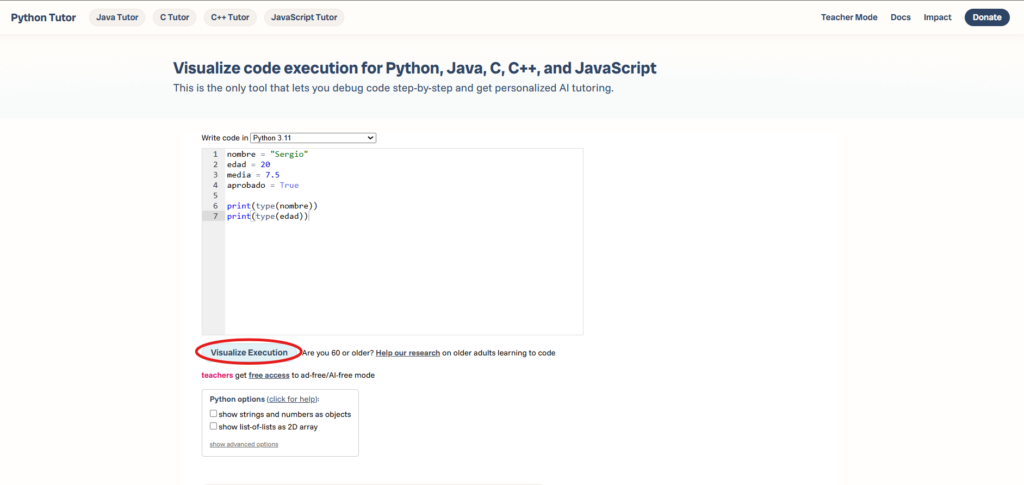
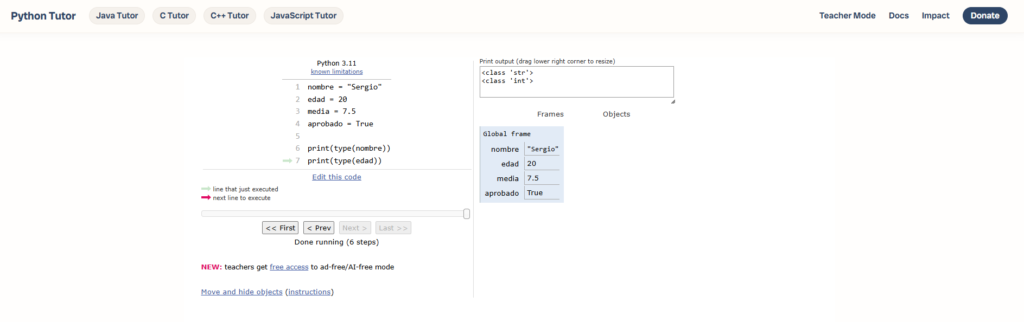
Verás cómo Python va creando cada variable en memoria con su tipo y su valor. Es la mejor forma de entender lo que está pasando realmente detrás del código.
Resumen rápido
- Una variable es un nombre que apunta a un valor
- Python deduce el tipo solo, no necesitas declararlo
- Los 4 tipos básicos son:
int,float,strybool input()siempre devuelve texto, convierte siempre conint()ofloat()"5"y5no son lo mismo — uno es texto, el otro es número
En el próximo artículo vemos los operadores, cómo hacer cálculos, comparaciones y operaciones lógicas con estos tipos de datos.



4 comentarios