
Variables and data types in Python — why Python thinks differently
Variables and data types in Python were one of the first things that confused me when I started my Data Science and Engineering degree. In Python you just write x = 5 and you have a variable. No type declaration. No telling the computer what kind of value it is. Coming from zero programming experience, that felt like magic.
In this article I’ll explain what’s actually happening behind the scenes, which data types you’ll use constantly, and the two mistakes with types that absolutely everyone makes at the beginning.
Table of Contents
What is a variable?
A variable is simply a name you give to a value so you can use it later. When you write:
age = 20
You’re telling Python: “store the value 20 and call it age”. From that point on, every time you use age in your code, Python knows it’s 20.
What makes Python different from languages like Java or C is that you don’t need to tell it what type the value is. In Java you’d have to write int age = 20. In C you’d write int age = 20;. In Python just age = 20 and Python figures it out on its own at runtime. This is called dynamic typing and it’s one of the main reasons Python is so popular for beginners, you can focus on the logic without worrying about types at every step.
Variables and data types in Python you’ll always use
Python has many data types but in your first year you’ll mainly work with four:
# Integer numbers (int)
age = 20
grade = 7

# Decimal numbers (float)
average = 7.5
height = 1.78

# Text (str)
name = "Sergio"
degree = "GCID"

# True or False (bool)
passed = True
enrolled = False
You can check what type any variable has at any moment using type():
print(type(age))       # <class 'int'>
print(type(average))   # <class 'float'>
print(type(name))      # <class 'str'>
print(type(passed))    # <class 'bool'>
The type() function is extremely useful when debugging, when a program gives you an unexpected result, checking the type of your variables is always the first thing to do.
The mistake everyone makes with input()
Here’s the mistake I made myself and saw in class many times. Imagine you want to ask the user for their age and add one year to it:
age = input("How old are you? ")
print(age + 1)
This gives an error. Why? Because input() in Python always returns text, even if the user types a number. So age is not the number 20, it’s the string "20". And you can’t add text to a number.
The solution is to convert the type immediately when you read the input:
age = int(input("How old are you? "))
print(age + 1)    # Works now
This is what the course notes call data type management, converting from one type to another. The most common conversions are:
int("20")      # converts text to integer → 20
float("7.5")   # converts text to decimal → 7.5
str(20)        # converts number to text → "20"
int(7.9)       # converts decimal to integer → 7 (truncates, doesn't round)
The last one is important, converting a float to int in Python truncates (removes the decimal part) rather than rounding. int(7.9) gives 7, not 8.
The other classic mistake — the ‘number’ that isn’t a number
There’s a subtle trap that confuses many beginners:
a = 5      # this is an integer
b = "5"    # this is text

print(a + a)  # result: 10
print(b + b)  # result: "55"  ← surprise!
When you add two strings in Python it doesn’t do maths, it concatenates them, joining them as text. That’s why "5" + "5" gives "55" and not 10. If you ever get a weird result when adding, always check whether your variables are actually numbers or text disguised as numbers.
This comes up constantly with input(), every value that comes from the user starts as text, even if it looks like a number.
Visualise it with Python Tutor
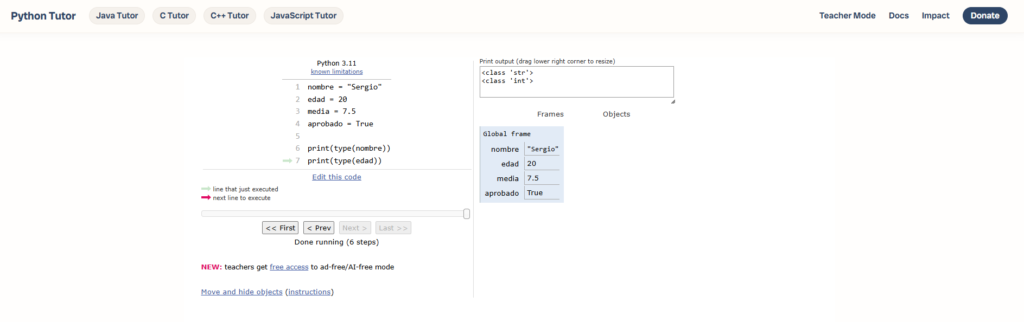
If you want to see exactly what happens in memory when you create variables, copy this code into pythontutor.com and click visualize execution:
name = "Sergio"
age = 20
average = 7.5
passed = True

print(type(name))
print(type(age))

# The input() mistake
value = "20"        # simulating what input() returns
result = int(value) # converting to integer
print(result + 1)   # 21
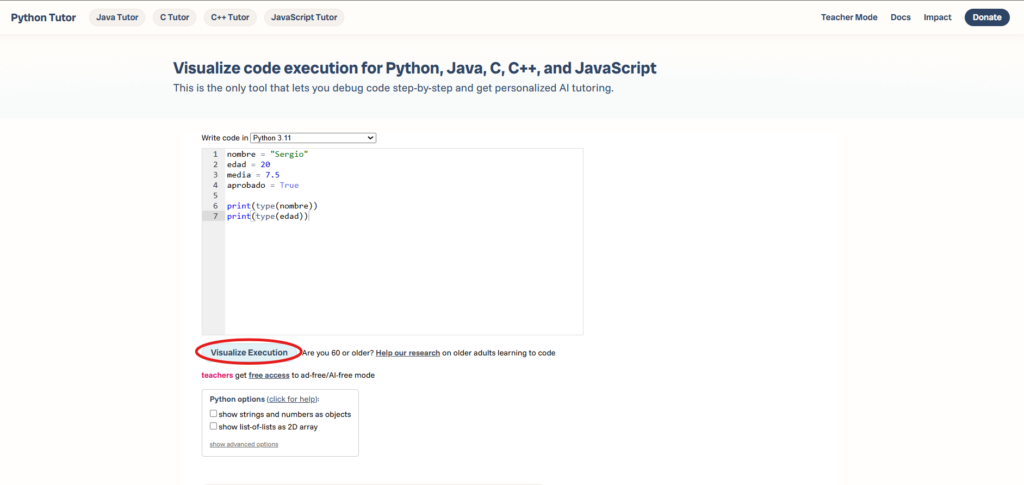
Step through the execution and watch how Python creates each variable in memory with its type and value. You’ll see clearly why "20" and 20 are different objects, one is text, the other is a number.
Quick summary
# A variable is a name pointing to a value
age = 20

# Python figures out the type automatically — dynamic typing
# No need to declare: int age = 20 (that's Java/C)

# The 4 basic types
age = 20        # int   → integer numbers
average = 7.5   # float → decimal numbers
name = "Sergio" # str   → text (always in quotes)
passed = True   # bool  → True or False (capital first letter)

# Check the type of any variable
print(type(age))    # <class 'int'>

# MISTAKE 1 — input() always returns text
age = input("Age: ")        # age is "20" — text
age = int(input("Age: "))   # age is 20 — number ← correct

# MISTAKE 2 — "5" and 5 are not the same
"5" + "5"   # → "55"  (concatenation)
5 + 5       # → 10    (addition)

# Type conversions
int("20")     # → 20    (text to integer)
float("7.5")  # → 7.5   (text to decimal)
str(20)       # → "20"  (number to text)
int(7.9)      # → 7     (truncates, doesn't round)
In the next article we look at operators, how to perform calculations, comparisons and logical operations with these data types.
Next step: practiceVariables and data types in Python — hands-on practice with VS CodeDid this article help you? Here is how you can support SergioLearns →

4 Comments